Showing posts with label drafting. Show all posts

Saturday, June 28, 2014

How To Format A Manuscript To Publishing Industry Standards

Hello, lovely YAtopians!!! 

Why yes, I am in a good mood and that's because I'm kicking it on the beach this week. In honor of vacation, I've decided to recycle an oldie, but a goodie- a blog post I wrote some time back about how to format a manuscript- since I'm still seeing a lot of manuscripts in my freelance editing that are, well, a bit funky in terms of formatting. 

Is standardized formatting a deal-breaker? Of course not. But getting it right does show you've taken the time to research the industry and THAT says a lot about you to an agent or editor. 

Here’s how to format so you look like a seasoned pro who has done your homework!
First things first. Your manuscript should be saved as “TITLE Last Name” so that it’s easily searchable when an agent needs to locate it on his/her Kindle/e-reader.  The title should be in all caps and your last name does not need to be. You could also indicate “partial” or “full” in the document name if that applies. Please, please, do not label “TITLE version 4768” or “TITLE draft 2013”. You may have been polishing your ms for years, but I’m not sure you want to share that information at this point in the process. If you are using Microsoft Word, save the file as a .doc as opposed to .docx as not all agents can open the newer docx format.
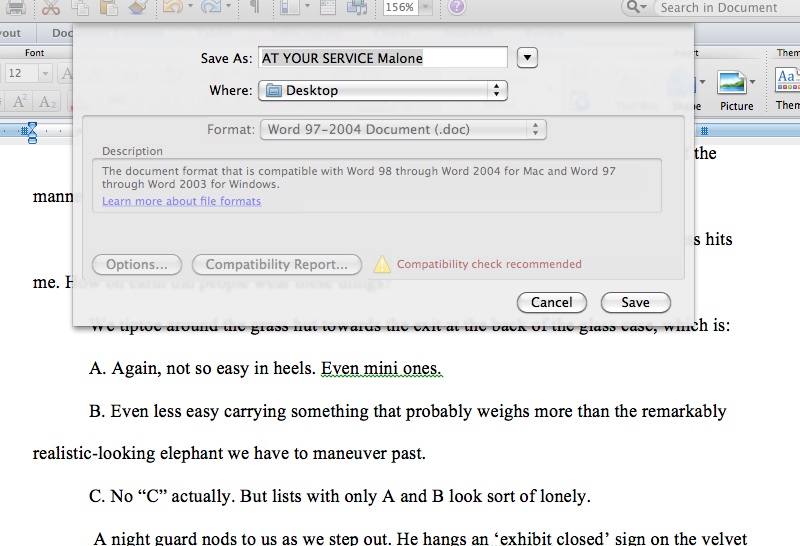
saing document
Next, your document should begin with a cover sheet that looks like the picture below.  For the sake of your career, take five minutes and set up a professionally-named email account to use so that your cover sheet does not include MomofTwelve@crazytown.com or “Shmoopylovecakes@glitter.com. The bottom half of this sheet will be blank. A final note on this: round your word count up or down to the nearest 1,000.
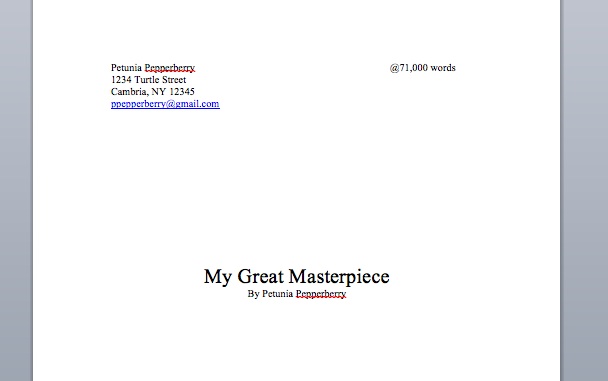
cover sheet
The next page is where your manuscript begins. First things first, include a header on every page for agents who like to print out submissions, so if the pages get swept up in a windstorm the agent will instantly know who wrote this brilliant thing they’re reading and how to put it back in order!  Include your title, name, and contact information in the header. You should also include page numbers in the opposite top corner or on the bottom of each page.
You do not need to format your manuscript to look like a printed book (I actually did this–complete with cover art–when I sent my ms to my very first reader and she very politely and with a straight face, suggested I, um, reformat ASAP!) This is not yet a book, it is a manuscript, so there is no need to drop your chapter beginnings to mid-page or include photos you envision enlivening your text (If it helps you feel like you’ve written a novel versus a term paper, by all means save a copy like this that you can revel in! But send the agents the one that looks like a boring dissertation and let your words do the impressing instead.)
It should look something like this:
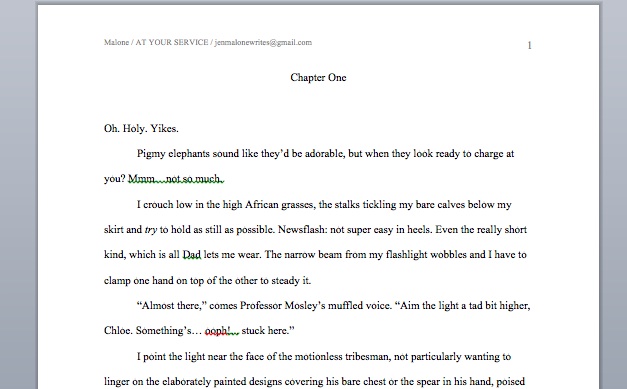
page one
Note above that I used a standard font (Times New Roman and Courier are the two most requested by agents) and size (12-point) for all text (you can go to 24-point for the title on your cover page but otherwise 12, 12, 12!  All text should be double-spaced..
Next, go grab a published book off your shelf.
Trust me on this.
Open to the first page of any chapter and peek at the first line. It’s not indented. I know, I KNOW. You never noticed this before, in all your years of reading. Your mind is blown! But it’s true: The first sentence of chapter openings and of scene breaks are NOT indented. If you follow my instructions below, you will be formatting your text to automatically indent each paragraph so this is something you’ll need to fix manually when you’re done writing.
Speaking of indenting.  You’ll want to format your ms so that you do not hit the tab bar even once in the document. You also do not want to hit the space bar five times with each new paragraph. But why, Jen? It all looks the same on the page. Yes. Yes, it does. But, fates willing, when this sells in a giant multi-book deal it won’t to the person at the big, fancy publishing house formatting your manuscript into a book. And, more importantly at this stage, it won’t on an ereader, where it is extremely likely your book will be read by a requesting agent.
Instead (for Microsoft Word), along the top menu bar, go to Format and select Paragraph. Then fill out the form as follows with regard to margins, spacing, and indentation. This will set up your document so that when you hit the return key, the cursor will automatically indent five spaces for the start of the new paragraph.
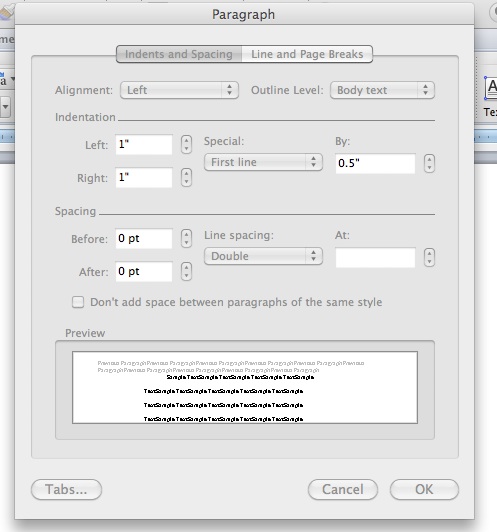
paragraph formating
You know how I mentioned above not hitting that space bar five times? You also don’t want to hit it twice. If you’re anything like me, you learned there were two spaces between sentences. Not no more! Now there is only one. If you can train yourself to write this way, you are golden. if you’re like me and just can’t get your brain to compute when you’re busy typing alllllll the words as fast as they form in your head, you can fix this at the very end. You’ll want to do a “Find and Replace”. Where you would ordinarily type a word for your computer to search for, you’re going to hit the space bar twice. Then go to the next line (replace) and hit the space bar once. Then hit enter. I would show you a pretty picture of this, but, well, it’s all kind of invisible. But it does work, I promise!
At the end of each chapter, select “Insert Page Break” from the Insert section along the top menu bar, rather than hitting return until you reach a blank page. As you revise, this will preserve your chapter breaks for you.
Finally, after the very last line of your ms, center a row of several ##### signs to let the reader know they’ve reached THE END!
On that note:
#########

Sunday, March 2, 2014

Writing Style


When it comes to writing, are you a “swooper” or a “basher?”
Let me quote Author Kurt Vonnegut’s definitions of each (as copied from page 137 of Timequake):
"Tellers of stories with ink on paper, not that they matter anymore, have been either swoopers or bashers. Swoopers write a story quickly, higgledy-piggledy, crinkum-crankum, any which way. Then they go over it again painstakingly, fixing everything that is just plain awful or doesn’t work. Bashers go one sentence at a time, getting it exactly right before they go on to the next one. When they’re done they’re done."
Vonnegut considered himself a basher. 
When I first started writing, I was definitely a swooper. Yup. I pounded out a story as fast as my fingers could type—and then I reviewed, revised, reworked, and edited for months! 
With each novel I've drafted, my process has evolved and I'm trending closer to being a basher now. A first draft can take me months to grind out. I sometimes agonize over ONE PARAGRAPH all day. I make sure I like a chapter or scene before I move to the next one. It's a lot more painstaking, but my final draft is a lot more polished and I end up cutting less in the long run.
So, what category do you fall under–”swooper” or “basher?” What are the pros and cons of each?
* * * * * * * 


Laura Diamond is a board certified psychiatrist and author of all things young adult paranormal, dystopian, and horror. She’s a lucid dreamer, meaning she can direct her dreams while they’re happening. When she’s awake, she pens stories from her dreams and shares them with her readers. Laura has many published titles including the Pride Series (New Pride, Shifting Pride, and Tsavo Pride), the Endure Series (Endure and Evoke), The Zodiac Collector, a novella Sunset Moon in the Lore anthology, and several shorts stories. When she’s not writing, she is working at the hospital, blogging at Author Laura Diamond--Lucid Dreamer, and renovating her 225+ year old fixer-upper mansion.

If you’re interested in reading more about Laura or interacting with her on the web, check out the following links:

Author Laura Diamond: www.authorlauradiamond.com

Sunday, February 2, 2014

Attack of the Internal Editor


I can say with relative confidence that my writing skills have steadily improved over the past five years. I can also safely say that I'm a sloppy panster at heart, even when I outline. Seriously. Every time I try to dictate where a story where go ahead of time, I veer off of it in less than a page. I'm not kidding.
Anyway, I've noticed that along with increasing skill comes increasing persnicketiness about what I write. This has benefits and drawbacks. I can admit--despite my previous writer life of rushed seat-of-the-pants-drafting-ways--it's good to slow down and take my time in crafting a novel. It forces me to choose awesome words instead of good ones. BUT, the pressure of picking the RIGHT word the first time often leads me to a stand still. Like literally.
Case in point. My most recent WIP (a young adult contemporary with psychological thriller elements) has been a complete blast to develop. The first six chapters practically wrote themselves. Yet it's gotten to the point that every time I open the document, I freeze. I can't decide what words to put on the page. What order do I want to write them? Who do I want to say what? Where do I want to put the description? What description do I want to include?
I don't know, I don't know, I don't know!!!
A surge of frustration forces--yes, forces!--me to procrastinate. I look at Facebook, Twitter, online forums. I watch an episode of South Park, The Office, or Family Guy.
Two hours later, I return to the MS and fret some more. Why hasn't the word count risen? (Duh. Cuz I didn't write anything. Geez.)
What's happening? Well, in my effort to "prove" I'm a good writer, I have unleashed the Hell beast otherwise known as the Internal Editor (cue horror movie soundtrack here). Any writerly person is very familiar with this monster. When properly fed and cared for, the internal editor can actually be helpful, even friendly. But when little devil runs amok through a first draft, it's akin to a disaster.
So, dear friends, I'd love to hear from you what strategies have helped you tame Internal Editor.
I'll start the dialogue by sharing my strategy:
  1. I free write. Screw picking great words. Just get the damn scene on the page.
  2. I re-read what I just wrote...and am pleasantly surprised it's not as icky as I'd imagined.
  3. I crit someone's work.
  4. I read a book and "take notes" from the pros.
  5. I take a break. Burn out doesn't do anybody any good. Just sayin'.
  6. I try to stop being my own worst enemy and let myself off the hook. It's impossible to be perfect the first go around, so why set such an unrealistic goal? Right? Right.
Alrighty folks, your turn. What strategies have you used to slay the Internal Editor...or at least negotiate a halfway decent working relationship? ;)
******

Laura Diamond is a board certified psychiatrist and author of all things young adult paranormal, dystopian, and horror. Her Young Adult Paranormal Romance novelette NEW PRIDE and novel SHIFTING PRIDE debuted late 2012. A spin off short story based on the lions of Tsavo, TSAVO PRIDE, is now available on Amazon. In 2013, her Young Adult Dystopians, ENDURE and EVOKE, were published by Renegade YA. Her Young Adult Paranormal Adventure, THE ZODIAC COLLECTOR, is coming 2014 by Spencer Hill Press. When she's not writing, she is working at the hospital, blogging at Author Laura Diamond--Lucid Dreamer, and renovating her 225+ year old fixer-upper mansion. 

If you’re interested in reading more about Laura or interacting with her on the web, check out the following links:

Author Laura Diamond: www.authorlauradiamond.com